Skip to content
Nuvologic Electronics, home Discuss your requirement

Nuvologic product · Industrial IoT edge gateway

Nuvolink IoT Gateway

Connect existing PLCs and machines to the Nuvologic monitoring dashboard, or to your own SCADA system or cloud, without replacing the control system. Nuvolink reads Modbus from your equipment and sends the data over MQTT or HTTPS, through Ethernet, Wi-Fi or LTE. An engineer checks your equipment first, so you know what you will get before you commit.

Intended buyers

Who Nuvolink is for

Teams that need data from machines or equipment in another system, such as a monitoring application, database or dashboard, without replacing what already works.

Automation integrators

Connecting equipment on a site to the monitoring or data system the end user already runs.

Machine OEMs

Adding connectivity to the machines you build, so you or your customers can see how they run.

Industrial businesses

Bringing data from existing equipment into one place without replacing the equipment itself.

Hardware

Built for the control cabinet

A compact industrial housing with every service connection on one side. It bridges your PLC’s serial network to Ethernet, Wi-Fi or mobile data, and keeps working through a dropped link.
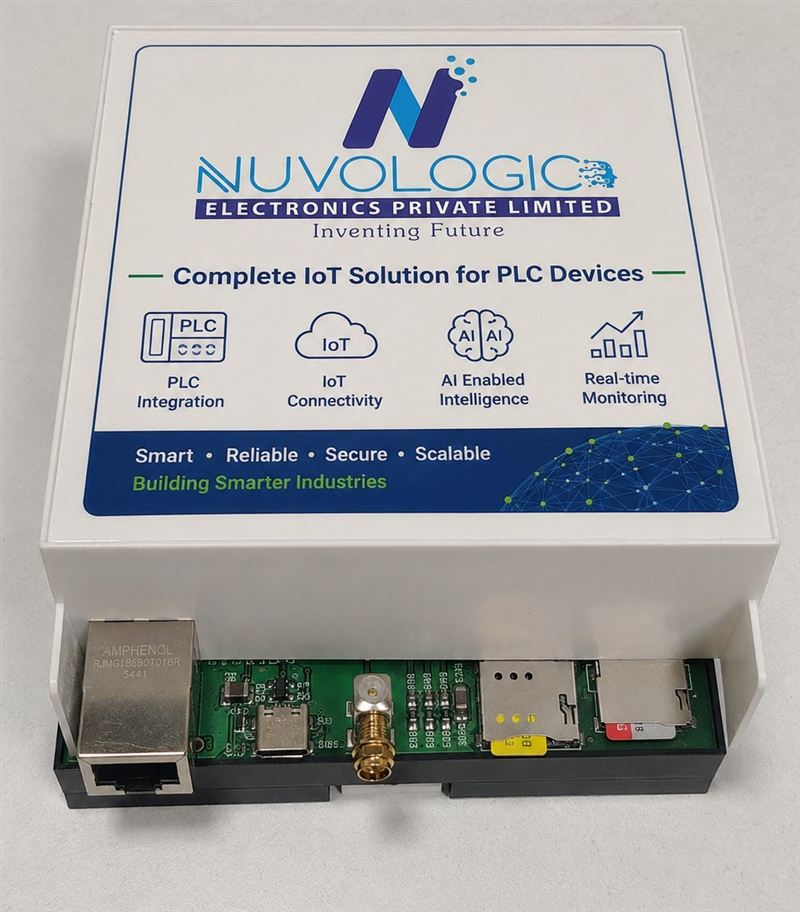
The Nuvolink gateway in its white industrial housing. Along the bottom edge, from left: the Ethernet socket, USB-C port, LTE antenna connector, SIM slot and microSD slot.
Nuvolink, service side. Connections numbered left to right.
  1. Ethernet one RJ45, TCP/IP, for the plant network
  2. USB Type-C local port
  3. LTE antenna SMA connector for an external antenna
  4. SIM push-push USIM slot for the LTE module (Quectel EC200U)
  5. microSD on-device storage for logs and buffered data

Also on board

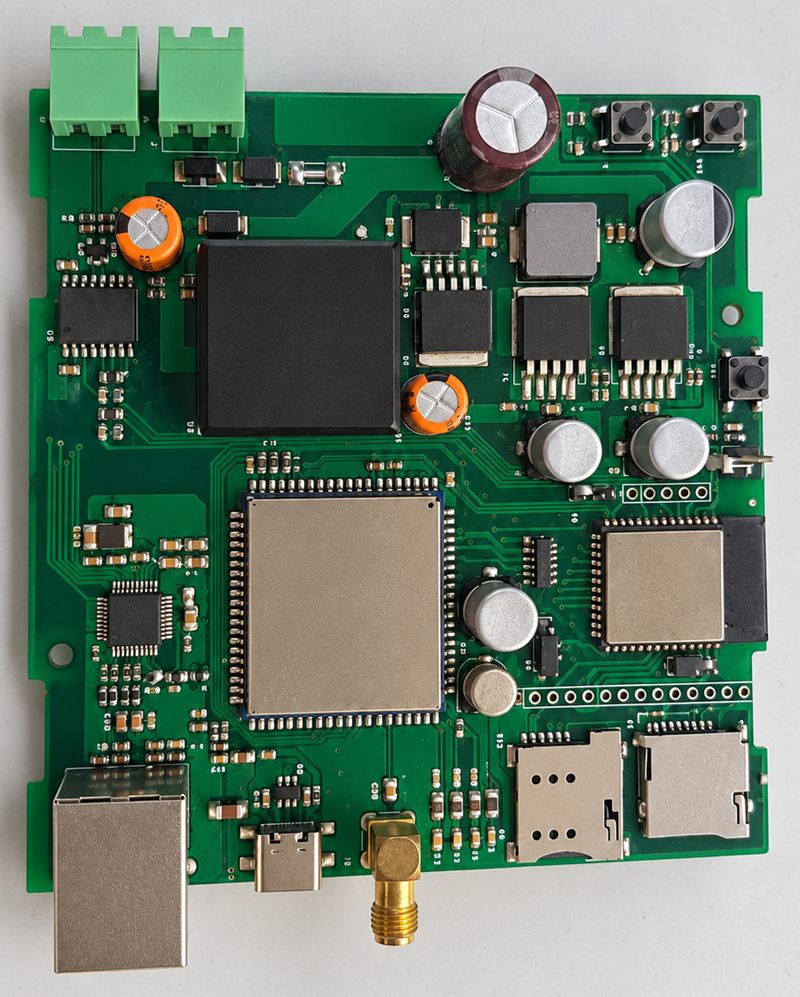
  • One isolated RS-485 interface with its own isolated supply, for serial links to PLCs and industrial controllers
  • 24 V DC industrial input with a TVS surge clamp and an isolated 5 V field rail
  • Wi-Fi and Bluetooth LE for plant networks and local configuration
  • Status LED and user push button
The Nuvolink gateway board out of its housing. Along the lower edge, from left: the Ethernet socket, USB-C port, LTE antenna connector, SIM slot and microSD slot. Two pluggable screw terminals at the top left.
Inside the housing: the Nuvolink board, designed and built by Nuvologic.

Protocols, environment and size

Nuvolink speaks Modbus to your equipment and MQTT or HTTP(S) to your systems. It is built to be mounted inside a control panel or enclosure.

From your equipment
Modbus RTU and Modbus ASCII over RS-485; Modbus TCP over Ethernet
To your systems
MQTT, HTTP and HTTPS
Operating temperature
0 to 70 °C
Protection
IP20: protected against finger contact, not against dust or water. Install inside a control panel or enclosure.
Size
110 × 105 × 48.55 mm (length × width × height)
  • 01

    PLC and industrial integration

    Galvanically isolated RS-485 for reliable serial connectivity to PLCs and controllers.

  • 02

    IoT connectivity

    Ethernet, Wi-Fi, Bluetooth LE and LTE, for the plant floor and remote sites.

  • 03

    Edge data processing

    Local acquisition, preprocessing, buffering and event handling on the gateway.

  • 04

    Real-time visibility

    Process data published to dashboards, maintenance workflows and multi-site monitoring.

Data path

From your machines to your systems

Nuvolink sits between the equipment that holds the data and the system that uses it. Pick what you run and where the data should go, and the path draws itself. Send it to us, and an engineer checks every link.

  1. 01

    Your equipment

    PLCs, energy meters, drives and instruments that already hold the values you need.

    Via One galvanically isolated RS-485 interface with a dedicated isolated supply; one Ethernet port (RJ45, TCP/IP) on the connector edge, with USB-C, the LTE antenna, SIM and microSD

    Reads Modbus RTU and Modbus ASCII over RS-485; Modbus TCP over Ethernet

  2. 02

    Nuvolink

    Reads the values from each device and passes them on in the form your system needs.

    Local acquisition, preprocessing, buffering and event handling

  3. 03

    Network

    Ethernet, Wi-Fi or mobile data, whichever your site has.

    Ethernet, Wi-Fi, Bluetooth LE and LTE

  4. 04

    Your system

    A dashboard, SCADA system, database or cloud platform: one you already run, or one built for you.

    To The Nuvologic monitoring dashboard (live readings, trends, alarms and reports), or your own dashboards, SCADA, maintenance workflows and cloud platforms

    Over MQTT, HTTP and HTTPS

Monitoring dashboard

See your machines live, from any browser

The Nuvologic monitoring dashboard is offered with Nuvolink: live readings for every machine, daily totals, trends, alarms and reports, by site and by user. If you already run SCADA or a cloud platform, Nuvolink sends the data there instead.
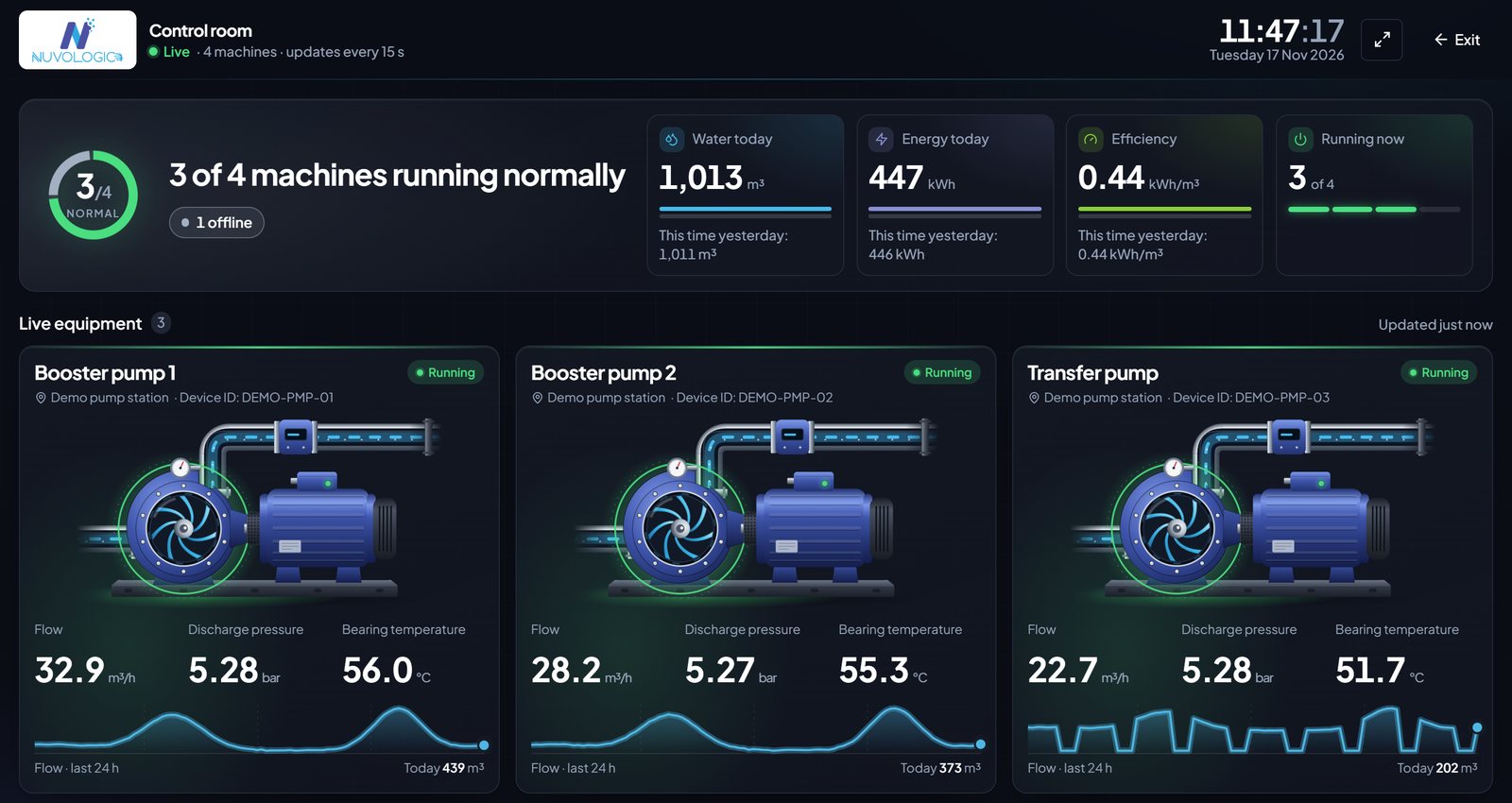
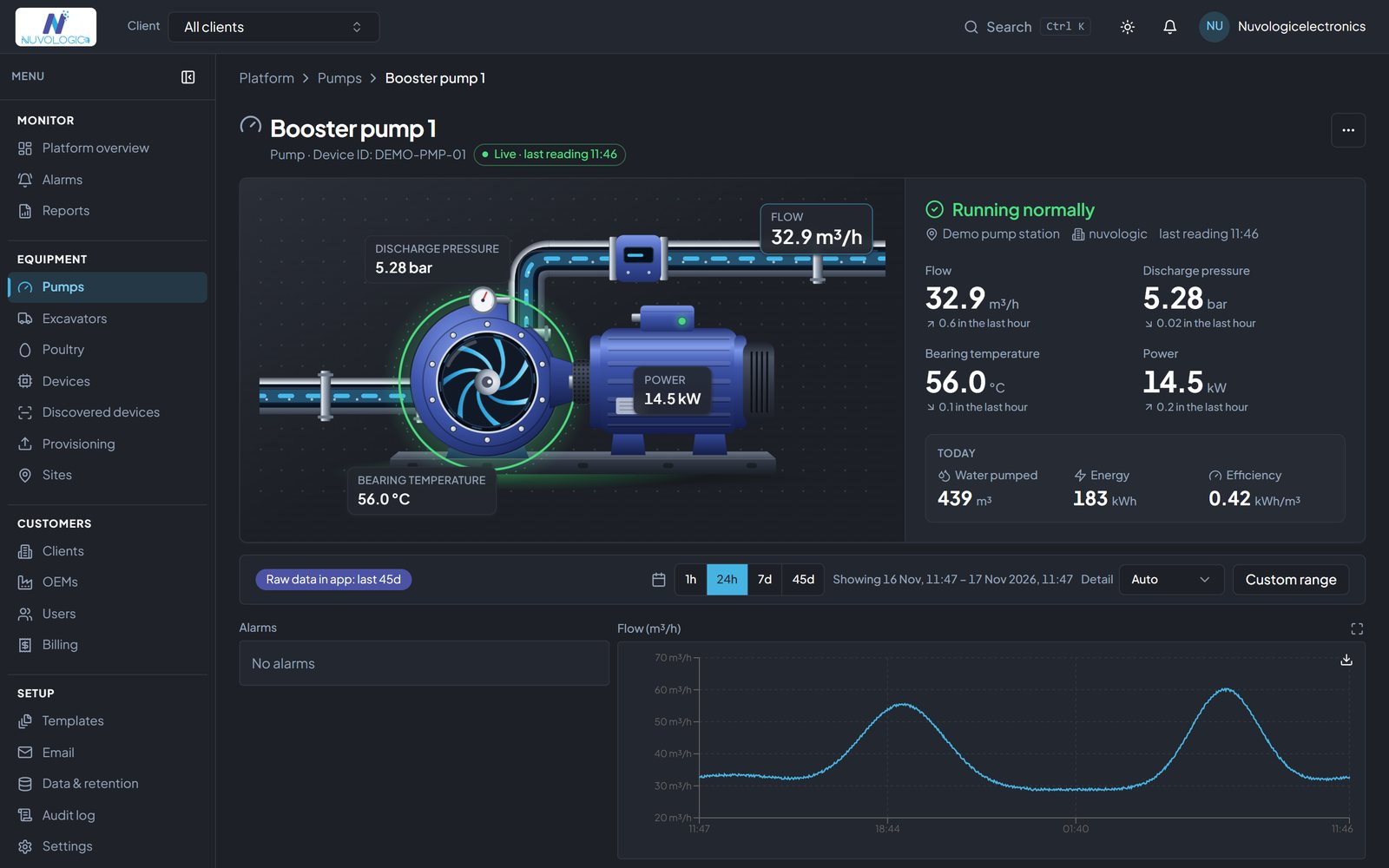
Control room view of the Nuvologic monitoring dashboard: three pumps running, with flow, discharge pressure and bearing temperature for each, a 24-hour flow trend, and water, energy and efficiency totals for the day compared with yesterday Detail view of one pump in the Nuvologic monitoring dashboard: live flow, discharge pressure, bearing temperature and power, today's water pumped, energy and efficiency, alarms and a 24-hour flow chart
  • Control room: every machine on one screen, updated every 15 seconds
  • Per machine: live values, change in the last hour, trends from 1 hour to 45 days
  • Daily totals: output, energy and efficiency, compared with the same time yesterday
  • Alarms and reports, with sites, users and access managed in the dashboard
Screens from the Nuvologic monitoring dashboard, shown with demo data from a pump station. Your dashboard shows the values your equipment provides, confirmed in the fit check.

Typical uses

Where Nuvolink fits

A practical bridge between installed PLCs and connected operations. Tell us your case and we check how Nuvolink fits it.

  • Machine monitoring. PLC data acquired at the edge and selected values published to dashboards or the cloud, for OEE, alarms and condition visibility.
  • Remote sites. LTE where Ethernet is not available: water, energy and other distributed assets.
  • Retrofit programmes. Installed PLCs connected without replacing the existing control stack.
  • Offline resilience. Local storage buffers logs and keeps machine data while the network is unreliable.

Downtime cost

What unplanned downtime costs you

Machine data is usually worth collecting when it shortens stoppages. Put in your own figures to see what unplanned downtime costs in a year.

The estimate needs JavaScript. You can also share your downtime figures in the enquiry form.

Fit check

Every installation starts with a fit check

Gateway projects go wrong when nobody checks the equipment first. We check yours before you commit, so you know what connects, which data you get and how it reaches your system.

What an engineer checks

  • How Nuvolink connects to each of your equipment’s interfaces
  • Which data points can be collected, and how often
  • How data reaches your destination system
  • Power, mounting and environment requirements for your site
  • How the gateway is configured and supported

What you receive

  • A fit assessment for your equipment and destination
  • The technical details that apply to your installation
  • A list of open points, if more information is needed
  • Commercial terms, when you ask for a quotation

Know the limits before you commit

  • Machine side is Modbus. Modbus RTU and ASCII over RS-485, Modbus TCP over Ethernet. Equipment that only speaks another fieldbus, such as PROFINET, EtherNet/IP or a vendor protocol, is not on the published list. The fit check tells you if it needs a converter.
  • One isolated RS-485 interface. Serial devices share one RS-485 bus. How many devices, and how often each is read, depends on the devices and is confirmed for your site.
  • System side is MQTT, HTTP or HTTPS. Other destination protocols, such as OPC UA, are not on the published list.
  • Installed inside a panel. IP20, 0 to 70 °C. Dusty, wet or outdoor locations need a suitable enclosure.
  • No certification is claimed here. If your project needs specific approvals, list them in your enquiry.
  1. 01

    Tell us what to connect

    Equipment make and model, its ports or protocols, the data you need and where it should go. Use the form, the data path tool or the machine data checklist.

  2. 02

    An engineer checks each device

    Register maps and interfaces are reviewed, and we ask about anything missing.

  3. 03

    You receive the fit assessment

    What connects, which data you get and how it reaches your system; a quotation when you ask for one.

Technical data

Specifications

Values for the Nuvolink hardware shown on this page. Mounting method, weight and certifications are not published yet. Everything that applies to your installation is confirmed in the fit check.

Request the product brochure

Machine side

Interfaces
One galvanically isolated RS-485 interface with a dedicated isolated supply; one Ethernet port (RJ45, TCP/IP) on the connector edge, with USB-C, the LTE antenna, SIM and microSD
Protocols
Modbus RTU and Modbus ASCII over RS-485; Modbus TCP over Ethernet

System side

Destinations
The Nuvologic monitoring dashboard (live readings, trends, alarms and reports), or your own dashboards, SCADA, maintenance workflows and cloud platforms
Protocols
MQTT, HTTP and HTTPS

Network

Connectivity
Ethernet, Wi-Fi, Bluetooth LE and LTE
Cellular
Quectel EC200U LTE module, push-push USIM slot, external SMA antenna

Edge functions

Data handling
Local acquisition, preprocessing, buffering and event handling
Storage
microSD for logs, buffered data and offline resilience

Electrical and mechanical

Power supply
24 V DC industrial input; 3.3 V logic; isolated 5 V field rail
Protection
TVS surge clamp on the supply input
Local interfaces
USB Type-C, status LED, user push button
Enclosure
Compact industrial housing; side access to Ethernet, USB-C, SMA, SIM and microSD
Ingress protection
IP20: protected against finger contact, not against dust or water. Install inside a control panel or enclosure.
Operating temperature
0 to 70 °C
Dimensions
110 × 105 × 48.55 mm (length × width × height)

Customer inputs

What to send us

Share what you have; we will ask about the rest. Equipment details matter most.

  • 01Equipment to connectType, make and model, and how many units.
  • 02Available interfacesPorts or protocols the equipment offers, if known.
  • 03Data you needWhich values, and how often they should be read.
  • 04DestinationWhere the data should go, for example a SCADA system, cloud platform, database or dashboard.
  • 05Site conditionsPower available, mounting space and the operating environment.
  • 06Network on siteWhether Ethernet, Wi-Fi or mobile coverage is available.
  • 07Quantity and timelineHow many gateways, and when you need them.
  • 08Existing documentsManuals, register maps or system diagrams help us review faster.

Machine data checklist. An Excel workbook for your equipment, the data points you need and your site details: everything the fit check needs. Fill it in and attach it to your enquiry.

Download (Excel, 7 KB)

Related evidence

Connectivity work by the same team

The Nuvologic team has delivered industrial interfaces and connected systems such as these, from Modbus over RS-485 to cloud dashboards.

Project details

CASE 01Industrial weighing

In Motion Weighing

Interfaces
Ethernet, USB, RS485, RS232; Modbus RTU and TCP
Data
Azure data storage, dashboards and an Android app

Read the case file

CASE 03Connected devices

Home Automation

Protocols
MQTT, HTTP/HTTPS, BLE and Wi-Fi with TLS
Firmware
OTA updates and RTOS-based communication

Read the case file

Process

From enquiry to supply

  1. 01

    Share your application

    Equipment, interfaces, data and destination, using the form or the data path tool.

  2. 02

    Fit check

    An engineer checks each device and asks about anything missing.

  3. 03

    Details for your site

    What connects, which data you get and how it reaches your system.

  4. 04

    Quotation and supply

    Quantities, delivery and support are agreed with you.

FAQs

Nuvolink questions

Not answered here? Ask in your enquiry, or call +91 73500 20304.

Which equipment and protocols does Nuvolink support?

On the machine side Nuvolink speaks Modbus: Modbus RTU and Modbus ASCII over its galvanically isolated RS-485 port, and Modbus TCP over Ethernet. On the system side it sends data over MQTT, HTTP or HTTPS, through Ethernet, Wi-Fi or LTE. Most PLCs, energy meters, drives and instruments offer Modbus, but which values can be read depends on each device’s register map, so we check each device instead of relying on a generic list. Send the make, model and available ports, or map them with the data path tool, and we tell you what connects and how.

Do I have to replace my machines or controllers?

No. Nuvolink is built for retrofits: it connects installed PLCs without replacing the existing control stack. The fit check confirms how for each device.

Can it work where there is no Ethernet?

Yes. Nuvolink has an LTE module (Quectel EC200U) with a SIM slot and an external antenna connector, and Wi-Fi. That suits remote sites such as water, energy and other distributed assets.

What happens when the network drops?

Nuvolink has its own storage (microSD) for logs and buffered data, so machine data is kept on the gateway while the connection is unreliable.

What power does it need?

A 24 V DC industrial supply, as found in most control panels. The input has TVS surge protection, and the RS-485 port has its own isolated supply.

Where can Nuvolink be installed?

Inside a control panel or enclosure. The housing is rated IP20: protected against finger contact, but not against dust or water. Nuvolink operates from 0 to 70 °C and measures 110 × 105 × 48.55 mm.

Can it send data to our existing SCADA, cloud platform or database?

Nuvolink sends data over MQTT, HTTP or HTTPS, which most cloud platforms, dashboards and data systems can receive, directly or through an MQTT broker. Tell us the destination system and how it receives data; we review it with your equipment details and confirm what is possible before you commit. Our guide Modbus RTU to MQTT: how machine data reaches your dashboard walks through a typical data path.

Can Nuvologic help with the wider integration?

Yes. Nuvologic also provides IoT integration services, including cloud integration and dashboards. Mention the wider scope in your enquiry.

How is pricing worked out?

Pricing depends on the application and quantity, and is provided in a quotation after the fit check.

Enquiry

Check Nuvolink for your equipment

Tell us what you want to connect and where its data should go. An engineer replies with a fit assessment, or the questions that remain.

  1. An engineer replies within one working day, by email or phone.
  2. We confirm fit or list the information we still need.
  3. We share details and a quotation when you are ready.

Send an enquiry

The topic is set to Nuvolink. You can change it.

    About the equipment

    About the controller

    About the project

    Scope needed (optional)

    Timeline, quotation or NDA (optional)

    We use these details only to respond to your enquiry. See our privacy policy.